Monday, July 9, 2018

SQL Server - Guidelines and Coding Standards complete List Download

https://blog.sqlauthority.com/2008/09/23/sql-server-coding-standards-guidelines-part-1/
  • Use “Pascal” notation for SQL server Objects Like Tables, Views, Stored Procedures. Also tables and views should have ending “s”.
Example:
UserDetails
Emails
  • If you have big subset of table group than it makes sense to give prefix for this table group. Prefix should be separated by _.
Example:
Page_ UserDetails
Page_ Emails
  • Use following naming convention for Stored Procedure. sp<Application Name>_[<group name >_]<action type><table name or logical instance> Where action is: Get, Delete, Update, Write, Archive, Insert… i.e. verb
Example:
spApplicationName_GetUserDetails
spApplicationName_UpdateEmails
  • Use following Naming pattern for triggers: TR_<TableName>_<action><description>
Example:
TR_Emails_LogEmailChanges
TR_UserDetails_UpdateUserName
  • Indexes : IX_<tablename>_<columns separated by_>
Example:
IX_UserDetails_UserID
  • Primary Key : PK_<tablename>
Example:
PK_UserDetails
PK_ Emails
  • Foreign Key : FK_<tablename_1>_<tablename_2>
Example:
FK_UserDetails_Emails
  • Default: DF_<table name>_<column name>
Example:
DF_ UserDetails _UserName
  • Normalize Database structure based on 3rd Normalization Form. Normalization is the process of designing a data model to efficiently store data in a database. (Read More Here)
  • Avoid use of SELECT * in SQL queries. Instead practice writing required column names after SELECTstatement.
Example:
1
2
SELECT Username, Password
FROM UserDetails
  • Use SET NOCOUNT ON at the beginning of SQL Batches, Stored Procedures and Triggers. This improves the performance of Stored Procedure. (Read More Here)
  • Properly format SQL queries using indents.
Example: Wrong Format
1
SELECT Username, Password FROM UserDetails ud INNER JOIN Employee e ON e.EmpID = ud.UserID
Example: Correct Format
1
2
3
SELECT Username, Password
FROM UserDetails ud
INNER JOIN Employee e ON e.EmpID = ud.UserID
  • Practice writing Upper Case for all SQL keywords.
Example:
SELECT, UPDATE, INSERT, WHERE, INNER JOIN, AND, OR, LIKE.
  • It is common practice to use Primary Key as IDENTITY column but it is not necessary. PK of your table should be selected very carefully.
  • If “One Table” references “Another Table” than the column name used in reference should use the following rule :
Column of Another Table : <OneTableName> ID
Example:
If User table references Employee table than the column name used in reference should be UserID where User is table name and ID primary column of User table and UserID is reference column of Employee table.
  • Columns with Default value constraint should not allow NULLs.
  • Practice using PRIMARY key in WHERE condition of UPDATE or DELETE statements as this will avoid error possibilities.
  • Always create stored procedure in same database where its relevant table exists otherwise it will reduce network performance.
  • Avoid server-side Cursors as much as possible, instead use SELECT statement. If you need to use cursor then replace it next suggestion.
  • Instead of using LOOP to insert data from Table B to Table A, try to use SELECT statement with INSERTstatement. (Read More Here)
1
2
3
4
INSERT INTO TABLE A (column1, column2)
SELECT column1, column2
FROM TABLE B
WHERE ....
  • Avoid using spaces within the name of database objects; this may create issues with front-end data access tools and applications. If you need spaces in your database object name then will accessing it surround the database object name with square brackets.
Example:
[Order Details]
  • Do not use reserved words for naming database objects, as that can lead to some unpredictable situations. (Read More Here)
  • Practice writing comments in stored procedures, triggers and SQL batches, whenever something is not very obvious, as it won’t impact the performance.
  • Do not use wild card characters at the beginning of word while search using LIKE keyword as it results in Index scan.
  • Indent code for better readability. (Example)
  • While using JOINs in your SQL query always prefix column name with the table name. (Example). If additionally require then prefix Table name with ServerName, DatabaseName, DatabaseOwner. (Example)
  • Default constraint must be defined at the column level. All other constraints must be defined at the table level. (Read More Here)
  • Avoid using rules of database objects instead use constraints.
  • Do not use the RECOMPILE option for Stored Procedure unless there is specific requirements.
  • Practice to put the DECLARE statements at the starting of the code in the stored procedure for better readability (Example)
  • Put the SET statements in beginning (after DECLARE) before executing code in the stored procedure. (Example)


https://blog.sqlauthority.com/2008/09/24/sql-server-coding-standards-guidelines-part-2/

    • To express apostrophe within a string, nest single quotes (two single quotes).
    Example:
    SET @sExample 'SQL''s Authority'
      • When working with branch conditions or complicated expressions, use parenthesis to increase readability.
      IF ((SELECT 1FROM TableNameWHERE 1=2ISNULL)
      • To mark single line as comment use (–) before statement. To mark section of code as comment use (/*…*/).
      • If there is no need of resultset then use syntax that doesn’t return a resultset.
      IF EXISTS   (SELECT 1
      FROM UserDetails
      WHERE UserID 50)
          Rather than,
        IF EXISTS  (SELECT COUNT (UserID)
        FROM UserDetails
        WHERE UserID 50)
        • Use graphical execution plan in Query Analyzer or SHOWPLAN_TEXT or SHOWPLAN_ALL commands to analyze SQL queries. Your queries should do an “Index Seek” instead of an “Index Scan” or a “Table Scan”. (Read More Here)
        • Do not prefix stored procedure names with “SP_”, as “SP_” is reserved for system stored procedures.
          Example:
          SP<App Name>_ [<Group Name >_] <Action><table/logical instance>
        • Incorporate your frequently required, complicated joins and calculations into a view so that you don’t have to repeat those joins/calculations in all your queries. Instead, just select from the view. (Read More Here)
        • Do not query / manipulate the data directly in your front end application, instead create stored procedures, and let your applications to access stored procedure.
        • Do not store binary or image files (Binary Large Objects or BLOBs) inside the database. Instead, store the path to the binary or image file in the database and use that as a pointer to the actual file stored on a server.
        • Use the CHAR datatype for a non-nullable column, as it will be the fixed length column, NULL value will also block the defined bytes.
        • Avoid using dynamic SQL statements if you can write T-SQL code without using them.
        • Minimize the use of Nulls. Because they incur more complexity in queries and updates. ISNULL and COALESCE functions are helpful in dealing with NULL values
        • Use Unicode datatypes, like NCHAR, NVARCHAR or NTEXT if it needed, as they use twice as much space as non-Unicode datatypes.
        • Always use column list in INSERT statements of SQL queries. This will avoid problem when table structure changes.
        • Perform all referential integrity checks and data validations using constraints instead of triggers, as they are faster. Limit the use of triggers only for auditing, custom tasks, and validations that cannot be performed using constraints.
        • Always access tables in the same order in all stored procedure and triggers consistently. This will avoid deadlocks. (Read More Here)
        • Do not call functions repeatedly in stored procedures, triggers, functions and batches, instead call the function once and store the result in a variable, for later use.
        • With Begin and End Transaction always use global variable @@ERROR, immediately after data manipulation statements (INSERT/UPDATE/DELETE), so that if there is an Error the transaction can be rollback.
        • Excessive usage of GOTO can lead to hard-to-read and understand code.
          • Do not use column numbers in the ORDER BY clause; it will reduce the readability of SQL query.
            Example: Wrong Statement
            SELECT UserIDUserNamePasswordFROM UserDetailsORDER BY 2
          Example: Correct Statement
          SELECT UserIDUserNamePasswordFROM UserDetailsORDER BY UserName
          • The RETURN statement is meant for returning the execution status only, but not data. If you need to return data, use OUTPUT parameters.
          • If stored procedure always returns single row resultset, then consider returning the resultset using OUTPUTparameters instead of SELECT statement, as ADO handles OUTPUT parameters faster than resultsets returned by SELECT statements.
          • Effective indexes are one of the best ways to improve performance in a database application.
          • BULK INSERT command helps to import a data file into a database table or view in a user‐specified format.
          • Use Policy Management to make or define and enforce your own policies fro configuring and managing SQL Server across the enterprise, eg. Policy that Prefixes for stored procedures should be sp.
          • Use sparse columns to reduce the space requirements for null values. (Read More Here)
          • Use MERGE Statement to implement multiple DML operations instead of writing separate INSERT, UPDATE, DELETE statements.
          • When some particular records are retrieved frequently, apply Filtered Index to improve query performace, faster retrieval and reduce index maintenance costs.
          • EXCEPT or NOT EXIST clause can be used in place of LEFT JOIN or NOT IN for better peformance.
          Example:
          SELECT EmpNoEmpName
          FROM EmployeeRecord
          WHERE Salary 1000 AND Salary
          NOT IN (SELECT Salary
          FROM EmployeeRecord
          WHERE Salary 2000);
              (Recomended)
            SELECT EmpNoEmpNameFROM EmployeeRecordWHERE Salery 1000EXCEPT
            SELECT 
            EmpNoEmpNameFROM EmployeeRecordWHERE Salery 2000ORDER BY EmpName;

            https://blog.sqlauthority.com/2007/06/05/sql-server-database-coding-standards-and-guidelines-part-2/
            SQL Server Database Coding Standards and Guidelines – Part 2

            Coding Standards

            • Optimize queries using the tools provided by SQL Server5
            • Do not use SELECT *
            • Return multiple result sets from one stored procedure to avoid trips from the application server to SQL server
            • Avoid unnecessary use of temporary tables
              • Use ‘Derived tables’ or CTE (Common Table Expressions) wherever possible, as they perform better6
            • Avoid using <> as a comparison operator
              • Use ID IN(1,3,4,5) instead of ID <> 2
            • Use SET NOCOUNT ON at the beginning of stored procedures7
            • Do not use cursors or application loops to do inserts8
              • Instead, use INSERT INTO
            • Fully qualify tables and column names in JOINs
            • Fully qualify all stored procedure and table references in stored procedures.
            • Do not define default values for parameters.
              • If a default is needed, the front end will supply the value.
            • Do not use the RECOMPILE option for stored procedures.
            • Place all DECLARE statements before any other code in the procedure.
            • Do not use column numbers in the ORDER BY clause.
            • Do not use GOTO.
            • Check the global variable @@ERROR immediately after executing a data manipulation statement (like INSERT/UPDATE/DELETE), so that you can rollback the transaction if an error occurs
              • Or use TRY/CATCH
            • Do basic validations in the front-end itself during data entry
            • Off-load tasks, like string manipulations, concatenations, row numbering, case conversions, type conversions etc., to the front-end applications if these operations are going to consume more CPU cycles on the database server
            • Always use a column list in your INSERT statements.
              • This helps avoid problems when the table structure changes (like adding or dropping a column).
            • Minimize the use of NULLs, as they often confuse front-end applications, unless the applications are coded intelligently to eliminate NULLs or convert the NULLs into some other form.
              • Any expression that deals with NULL results in a NULL output.
              • The ISNULL and COALESCE functions are helpful in dealing with NULL values.
            • Do not use the identitycol or rowguidcol.
            • Avoid the use of cross joins, if possible.
            • When executing an UPDATE or DELETE statement, use the primary key in the WHERE condition, if possible. This reduces error possibilities.
            • Avoid using TEXT or NTEXT datatypes for storing large textual data.9
              • Use the maximum allowed characters of VARCHAR instead
            • Avoid dynamic SQL statements as much as possible.10
            • Access tables in the same order in your stored procedures and triggers consistently.11
            • Do not call functions repeatedly within your stored procedures, triggers, functions and batches.12
            • Default constraints must be defined at the column level.
            • Avoid wild-card characters at the beginning of a word while searching using the LIKE keyword, as these results in an index scan, which defeats the purpose of an index.
            • Define all constraints, other than defaults, at the table level.
            • When a result set is not needed, use syntax that does not return a result set.13
            • Avoid rules, database level defaults that must be bound or user-defined data types. While these are legitimate database constructs, opt for constraints and column defaults to hold the database consistent for development and conversion coding.
            • Constraints that apply to more than one column must be defined at the table level.
            • Use the CHAR data type for a column only when the column is non-nullable.14
            • Do not use white space in identifiers.
            • The RETURN statement is meant for returning the execution status only, but not data.
            Reference:
            SQL SERVER - Database Coding Standards and Guidelines - Part 2 codingstandard
            5) Use the graphical execution plan in Query Analyzer or SHOWPLAN_TEXT or SHOWPLAN_ALL commands to analyze your queries. Make sure your queries do an “Index seek” instead of an “Index scan” or a “Table scan.” A table scan or an index scan is a highly undesirable and should be avoided where possible.
            6) Consider the following query to find the second highest offer price from the Items table:
            1
            2
            3
            4
            5
            6
            7
            8
            SELECT MAX(Price)
            FROM Products
            WHERE ID IN
            (
            SELECT TOP 2 ID
            FROM Products
            ORDER BY Price DESC
            )
            The same query can be re-written using a derived table, as shown below, and it performs generally twice as fast as the above query:
            1
            2
            3
            4
            5
            6
            7
            SELECT MAX(Price)
            FROM
            (
            SELECT TOP 2 Price
            FROM Products
            ORDER BY Price DESC
            )
            7) This suppresses messages like ‘(1 row(s) affected)’ after executing INSERT, UPDATE, DELETE and SELECT statements. Performance is improved due to the reduction of network traffic.
            8) Try to avoid server side cursors as much as possible. Always stick to a ‘set-based approach’ instead of a ‘procedural approach’ for accessing and manipulating data. Cursors can often be avoided by using SELECT statements instead. If a cursor is unavoidable, use a WHILE loop instead. For a WHILE loop to replace a cursor, however, you need a column (primary key or unique key) to identify each row uniquely.
            9) You cannot directly write or update text data using the INSERT or UPDATE statements. Instead, you have to use special statements like READTEXT, WRITETEXT and UPDATETEXT. So, if you don’t have to store more than 8KB of text, use the CHAR(8000) or VARCHAR(8000) datatype instead.
            10) Dynamic SQL tends to be slower than static SQL, as SQL Server must generate an execution plan at runtime. IF and CASE statements come in handy to avoid dynamic SQL.
            11) This helps to avoid deadlocks. Other things to keep in mind to avoid deadlocks are:
            • Keep transactions as short as possible.
            • Touch the minimum amount of data possible during a transaction.
            • Never wait for user input in the middle of a transaction.
            • Do not use higher level locking hints or restrictive isolation levels unless they are absolutely needed.
            12) You might need the length of a string variable in many places of your procedure, but don’t call the LEN function whenever it’s needed. Instead, call the LEN function once and store the result in a variable for later use.
            13)
            1
            2
            3
            4
            IF EXISTS (
             SELECT 1
             FROM Products
             WHERE ID = 50)
            Instead Of:
            1
            2
            3
            4
            IF EXISTS (
             SELECT COUNT(ID)
             FROM Products
             WHERE ID = 50)
            14) CHAR(100), when NULL, will consume 100 bytes, resulting in space wastage. Preferably, use VARCHAR(100) in this situation. Variable-length columns have very little processing overhead compared with fixed-length columns.

            Wednesday, May 30, 2018

            backup job with proper error message

            USE [master]
            GO
            /****** Object:  StoredProcedure [dbo].[BackupProcess]    Script Date: 5/31/2018 4:34:46 AM ******/
            SET ANSI_NULLS OFF
            GO
            SET QUOTED_IDENTIFIER ON
            GO

            -- =============================================
            -- Author: Naveen Gupta
            -- Create date: 10-Nov-2015
            -- Description: To Take the backup of required databases
            -- =============================================

            ALTER PROCEDURE [dbo].[BackupProcess]

            AS

            BEGIN

            DECLARE @name VARCHAR(50) -- database name 
            DECLARE @path VARCHAR(256) -- path for backup files 
            DECLARE @fileName VARCHAR(256) -- filename for backup 
            DECLARE @fileDate VARCHAR(20) -- used for file name
            Declare @SQL varchar(1000)=''
            declare @begintime nvarchar(100) ='05/31/2018'
            declare @result varchar(max)
            -- specify database backup directory
            SET @path = 'D:\MSSQL\Backup\' 


            -- specify filename format
            SELECT @fileDate = CONVERT(VARCHAR(20),GETDATE(),112) + REPLACE(CONVERT(VARCHAR(20),GETDATE(),108),':','')


            DECLARE db_cursor CURSOR FOR 
            SELECT name
            FROM master.dbo.sysdatabases where name in ('pOrbisNAFTA')
            --WHERE name IN ('master','model','msdb','tempdb')  -- exclude these databases


            OPEN db_cursor 
            FETCH NEXT FROM db_cursor INTO @name 


            WHILE @@FETCH_STATUS = 0 
            BEGIN 
            SET @fileName = @path + @name + '_' + @fileDate + '.BAK' 
            select @fileName,@name
            BEGIN Try
            --BACKUP DATABASE @name TO DISK = @fileName  WITH NOFORMAT, NOINIT,  SKIP, NOREWIND, NOUNLOAD, COMPRESSION,  STATS = 10
            select @fileName,@name
            BACKUP DATABASE @name TO DISK = @fileName  WITH NOFORMAT, NOINIT,  SKIP, NOREWIND, NOUNLOAD,   STATS = 10
            SET @SQL = 'insert into ' + @name +'.dbo.EmailSchedule(Subject,emailto,emailcc,Body) select ''Backup'',''narenderp@damcogroup.com'',''GauravH@damcogroup.com'',''Backup of database ' + convert(varchar(100),@name) + ' has been done successfully.'''
            EXEC(@sql)
            END TRY
            BEGIN CAtch

            SELECT ERROR_MESSAGE(),ERROR_SEVERITY(), ERROR_STATE(),ERROR_PROCEDURE()
            IF OBJECT_ID('tempdb.dbo.#Results') IS NOT NULL DROP TABLE #Results
            CREATE TABLE #Results (LogDate datetime,ProcessInfo nvarchar(100),LogText nvarchar(4000))
            INSERT #Results
            EXEC  xp_readerrorlog  0, 1, N'Backup',@name,@begintime

            SELECT @result = LogText from #Results where ProcessInfo = 'spid'+cast(@@SPID as varchar(6)) order by logdate desc

            SET @SQL = 'insert into ' + @name +'.dbo.EmailSchedule(Subject,emailto,emailcc,Body) select ''Backup'',''narenderp@damcogroup.com'',''GauravH@damcogroup.com'',''Backup of database ' + convert(varchar(max),@result) + ' has been failed.'''
            SELECT @result
            EXEC(@sql)
            END Catch
            FETCH NEXT FROM db_cursor INTO @name 
            END 
            CLOSE db_cursor 
            DEALLOCATE db_cursor

            END

            Thursday, May 10, 2018

            Read JSON

            Compatibility must be 130 or above to run openjson command

            http://jsonviewer.stack.hu/

            https://stackoverflow.com/questions/37218254/sql-server-openjson-read-nested-json?utm_medium=organic&utm_source=google_rich_qa&utm_campaign=google_rich_qa


            declare @json nvarchar(max)
            set @json = '
            [
               {
                  "IdProject":"97A76363-095D-4FAB-940E-9ED2722DBC47",
                  "Name":"Test Project",
                  "structures":[
                     {
                        "IdStructure":"CB0466F9-662F-412B-956A-7D164B5D358F",
                        "IdProject":"97A76363-095D-4FAB-940E-9ED2722DBC47",
                        "Name":"Test Structure",
                        "BaseStructure":"Base Structure",
                        "DatabaseSchema":"dbo",
                        "properties":[
                           {
                              "IdProperty":"618DC40B-4D04-4BF8-B1E6-12E13DDE86F4",
                              "IdStructure":"CB0466F9-662F-412B-956A-7D164B5D358F",
                              "Name":"Test Property 2",
                              "DataType":1,
                              "Precision":0,
                              "Scale":0,
                              "IsNullable":false,
                              "ObjectName":"Test Object",
                              "DefaultType":1,
                              "DefaultValue":""
                           },
                           {
                              "IdProperty":"FFF433EC-0BB5-41CD-8A71-B5F09B97C5FC",
                              "IdStructure":"CB0466F9-662F-412B-956A-7D164B5D358F",
                              "Name":"Test Property 1",
                              "DataType":1,
                              "Precision":0,
                              "Scale":0,
                              "IsNullable":false,
                              "ObjectName":"Test Object",
                              "DefaultType":1,
                              "DefaultValue":""
                           }
                        ]
                     }
                  ]
               }
            ]';

            select
                Projects.IdProject, Projects.Name as NameProject,
                Structures.IdStructure, Structures.Name as NameStructure, Structures.BaseStructure, Structures.DatabaseSchema,
                Properties.* 
            from   openjson (@json)
            with
            (
                IdProject uniqueidentifier,
                Name nvarchar(100),
                structures nvarchar(max) as json
            )
            as Projects
            cross apply openjson (Projects.structures)
            with
            (
                IdStructure uniqueidentifier,
                Name nvarchar(100),
                BaseStructure nvarchar(100),
                DatabaseSchema sysname,
                properties nvarchar(max) as json
            ) as Structures
            cross apply openjson (Structures.properties)
            with
            (
                IdProperty uniqueidentifier,
                NamePreoperty nvarchar(100) '$.Name',
                DataType int,
                [Precision] int,
                [Scale] int,
                IsNullable bit,
                ObjectName nvarchar(100),
                DefaultType int,
                DefaultValue nvarchar(100)
            )
            as Properties
            ************************************


            USE [JS]
            GO
            /****** Object:  StoredProcedure [dbo].[DashboardJSON]    Script Date: 5/10/2018 6:07:27 AM ******/
            SET ANSI_NULLS OFF
            GO
            SET QUOTED_IDENTIFIER ON
            GO


            -- =============================================
            -- Author: Naveen Gupta
            -- Create date: 07-May-2018
            -- Description: To Find out the relevant values for Localization table from Dashboard JSON
            -- =============================================

            --EXEC DashboardJSON '{"Employees":[{"uid":"ctrl_2yvnm1g77","data":"{\"kpioverview\":{\"title\":\"KPI Overview\",\"resourceId\":\"DashNAFTA_42_90_kpioverview_ctrl_2yvnm1g77\",\"height\":\"\",\"show_gap_column\":false,\"show_traffic_light\":false,\"show_Value\":false,\"Define_Orange\":\"\",\"show_benchmark_analysis\":false,\"benchmark_analysis_columns\":\"1\",\"show_trend_graph\":false,\"show_map\":false,\"filter_top1_percent\":\"\",\"filter_top2_percent\":\"\",\"filter_bottom1_percent\":\"\",\"filter_bottom2_percent\":\"\",\"kpicolumns\":{\"col1\":\"Last\",\"col2\":\"DOECountryAvg\",\"col3\":\"DOERegionAvg\",\"col4\":\"DOEVolumeGroupAvg\"},\"kpimap\":{\"hierarchy\":\"\",\"allowedallcheck\":\"true\",\"filter\":\"alldealer\"},\"kpi\":[{\"kpitext\":\"Total CNHI Parts Inventory - em % Ativo Total\",\"id\":\"assets.total.cnhi.inventories.parts.perc.value_P\",\"order\":\"0\",\"reverse_logic\":false,\"red_value\":\"100.00\",\"orange_value\":\"100.00 to 500.00\",\"green_value\":\"500.00\",\"resourceId\":\"DashNAFTA_42_90_kpioverview_ctrl_2yvnm1g77_assets.total.cnhi.inventories.parts.perc.value_P\"}]}}"},{"uid":"ctrl_1gyawpvos","data":"{\"dealerprofile\":{\"title\":\"Dealer Profile Overview\",\"resourceId\":\"DashNAFTA_42_90_DealerProfile_ctrl_1gyawpvos\",\"height\":\"\",\"profilefields\":\"NumberofSubmissionLocations\"}}"},{"uid":"ctrl_7k68gz4pc","data":"{\"myreports\":{\"title\":\"My Reports\",\"resourceId\":\"DashNAFTA_42_90_Report_ctrl_7k68gz4pc\",\"height\":\"\",\"count\":\"100\"}}"},{"uid":"ctrl_bdxsuhnve","data":"{\"newsflash\":{\"title\":\"Newsflash Widget\",\"resourceId\":\"DashNAFTA_42_90_News_ctrl_bdxsuhnve\",\"height\":\"\",\"count\":\"10\",\"maxwords\":\"\"}}"}]}'
            --EXEC DashboardJSON '[{"uid":"ctrl_2yvnm1g77","data":"{\"kpioverview\":{\"title\":\"KPI Overview\",\"resourceId\":\"DashNAFTA_42_90_kpioverview_ctrl_2yvnm1g77\",\"height\":\"\",\"show_gap_column\":false,\"show_traffic_light\":false,\"show_Value\":false,\"Define_Orange\":\"\",\"show_benchmark_analysis\":false,\"benchmark_analysis_columns\":\"1\",\"show_trend_graph\":false,\"show_map\":false,\"filter_top1_percent\":\"\",\"filter_top2_percent\":\"\",\"filter_bottom1_percent\":\"\",\"filter_bottom2_percent\":\"\",\"kpicolumns\":{\"col1\":\"Last\",\"col2\":\"DOECountryAvg\",\"col3\":\"DOERegionAvg\",\"col4\":\"DOEVolumeGroupAvg\"},\"kpimap\":{\"hierarchy\":\"\",\"allowedallcheck\":\"true\",\"filter\":\"alldealer\"},\"kpi\":[{\"kpitext\":\"Total CNHI Parts Inventory - em % Ativo Total\",\"id\":\"assets.total.cnhi.inventories.parts.perc.value_P\",\"order\":\"0\",\"reverse_logic\":false,\"red_value\":\"100.00\",\"orange_value\":\"100.00 to 500.00\",\"green_value\":\"500.00\",\"resourceId\":\"DashNAFTA_42_90_kpioverview_ctrl_2yvnm1g77_assets.total.cnhi.inventories.parts.perc.value_P\"}]}}"},{"uid":"ctrl_1gyawpvos","data":"{\"dealerprofile\":{\"title\":\"Dealer Profile Overview\",\"resourceId\":\"DashNAFTA_42_90_DealerProfile_ctrl_1gyawpvos\",\"height\":\"\",\"profilefields\":\"NumberofSubmissionLocations\"}}"},{"uid":"ctrl_7k68gz4pc","data":"{\"myreports\":{\"title\":\"My Reports\",\"resourceId\":\"DashNAFTA_42_90_Report_ctrl_7k68gz4pc\",\"height\":\"\",\"count\":\"100\"}}"},{"uid":"ctrl_bdxsuhnve","data":"{\"newsflash\":{\"title\":\"Newsflash Widget\",\"resourceId\":\"DashNAFTA_42_90_News_ctrl_bdxsuhnve\",\"height\":\"\",\"count\":\"10\",\"maxwords\":\"\"}}"}]'
            --EXEC DashboardJSON '[{"uid":"ctrl_2yvnm1g77","data":"{\"kpioverview\":{\"title\":\"KPI Overview\",\"resourceId\":\"DashNAFTA_42_90_kpioverview_ctrl_2yvnm1g77\",\"height\":\"\",\"show_gap_column\":false,\"show_traffic_light\":false,\"show_Value\":false,\"Define_Orange\":\"\",\"show_benchmark_analysis\":false,\"benchmark_analysis_columns\":\"1\",\"show_trend_graph\":false,\"show_map\":false,\"filter_top1_percent\":\"\",\"filter_top2_percent\":\"\",\"filter_bottom1_percent\":\"\",\"filter_bottom2_percent\":\"\",\"kpicolumns\":{\"col1\":\"Last\",\"col2\":\"DOECountryAvg\",\"col3\":\"DOERegionAvg\",\"col4\":\"DOEVolumeGroupAvg\"},\"kpimap\":{\"hierarchy\":\"\",\"allowedallcheck\":\"true\",\"filter\":\"alldealer\"},\"kpi\":[{\"kpitext\":\"Total CNHI Parts Inventory - em % Ativo Total\",\"id\":\"assets.total.cnhi.inventories.parts.perc.value_P\",\"order\":\"0\",\"reverse_logic\":false,\"red_value\":\"100.00\",\"orange_value\":\"100.00 to 500.00\",\"green_value\":\"500.00\",\"resourceId\":\"DashNAFTA_42_90_kpioverview_ctrl_2yvnm1g77_assets.total.cnhi.inventories.parts.perc.value_P\"}]}}"},{"uid":"ctrl_1gyawpvos","data":"{\"dealerprofile\":{\"title\":\"Dealer Profile Overview\",\"resourceId\":\"DashNAFTA_42_90_DealerProfile_ctrl_1gyawpvos\",\"height\":\"\",\"profilefields\":\"NumberofSubmissionLocations\"}}"},{"uid":"ctrl_7k68gz4pc","data":"{\"myreports\":{\"title\":\"My Reports\",\"resourceId\":\"DashNAFTA_42_90_Report_ctrl_7k68gz4pc\",\"height\":\"\",\"count\":\"100\"}}"},{"uid":"ctrl_bdxsuhnve","data":"{\"newsflash\":{\"title\":\"Newsflash Widget\",\"resourceId\":\"DashNAFTA_42_90_News_ctrl_bdxsuhnve\",\"height\":\"\",\"count\":\"10\",\"maxwords\":\"\"}}"},{"uid":"ctrl_kh4v33nzo","data":"{\"kpioverview\":{\"title\":\"KPI Overview 2\",\"resourceId\":\"DashNAFTA_42_90_kpioverview_ctrl_kh4v33nzo\",\"height\":\"700\",\"show_gap_column\":true,\"show_traffic_light\":true,\"show_Value\":true,\"Define_Orange\":\"\",\"show_benchmark_analysis\":true,\"benchmark_analysis_columns\":\"1\",\"show_trend_graph\":true,\"show_map\":false,\"filter_top1_percent\":\"\",\"filter_top2_percent\":\"\",\"filter_bottom1_percent\":\"\",\"filter_bottom2_percent\":\"\",\"kpicolumns\":{\"col1\":\"Last\",\"col2\":\"DOECountryAvg\",\"col3\":\"DOERegionAvg\",\"col4\":\"DOEVolumeGroupAvg\"},\"kpimap\":{\"hierarchy\":\"\",\"allowedallcheck\":\"true\",\"filter\":\"alldealer\"},\"kpi\":[{\"kpitext\":\"% of Parts GP for Parts Person Test\",\"id\":\"turnover.ratio.parts.gp.for.parts.compensation.value_P\",\"order\":\"0\",\"reverse_logic\":false,\"red_value\":\"1000.00\",\"orange_value\":\"1,000.00 to 5,000.00\",\"green_value\":\"5000.00\",\"resourceId\":\"DashNAFTA_42_90_kpioverview_ctrl_kh4v33nzo_turnover.ratio.parts.gp.for.parts.compensation.value_P\"},{\"kpitext\":\"<59 PTO Tractors - Actual Inventory Units\",\"id\":\"ue.det.under.59.pto.tractor.inv.unit.value.850_U\",\"order\":\"0\",\"reverse_logic\":false,\"red_value\":\"100.00\",\"orange_value\":\"100.00 to 5,000.00\",\"green_value\":\"5000.00\",\"resourceId\":\"DashNAFTA_42_90_kpioverview_ctrl_kh4v33nzo_ue.det.under.59.pto.tractor.inv.unit.value.850_U\"}]}}"},{"uid":"ctrl_x2nm3g7ef","data":"{\"kpipiechart\":{\"title\":\"KPI Pie-Chart Test\",\"resourceId\":\"DashNAFTA_42_90_PieChart_ctrl_x2nm3g7ef\",\"height\":\"\",\"kpi\":\"turnover.ratio.parts.gp.for.parts.compensation.value,turnover.ratio.wholegoods.gp.for.sales.compensation.value\"}}"}]'
            ALTER PROCEDURE [dbo].[DashboardJSON] @json nvarchar(max)
            AS
            BEGIN

            Declare @JSONValue nvarchar(max)
            Declare @JSONValueMain nvarchar(max)
            Declare @JSONValue1 nvarchar(max)
            Declare @ID nvarchar(max), @Value nvarchar(max)
            Declare @Localization as Table (ID nvarchar(max), Value nvarchar(max))
            SET @json = '{"MainData":' + @json + '}'

            DECLARE JSONDataMain CURSOR FOR
            SELECT Value FROM OPENJSON(@json,'$.MainData') --where [key]='data'
            OPEN JSONDataMain
            FETCH NEXT FROM JSONDataMain INTO @JSONValueMain
            WHILE @@FETCH_STATUS = 0
            BEGIN
            ------------------------
            SET @JSONValueMain = '{"MainData":' + @JSONValueMain + '}'
            DECLARE JSONData CURSOR FOR
            SELECT Value FROM OPENJSON(@JSONValueMain,'$.MainData') where [key]='data'
            OPEN JSONData
            FETCH NEXT FROM JSONData INTO @JSONValue
            WHILE @@FETCH_STATUS = 0
            BEGIN
            SET @ID = NULL
            SET @Value = NULL
            select  @ID = Value from  OPENJSON(@JSONValue, '$.kpioverview') Where [key]='resourceId'
            select  @Value = Value from  OPENJSON(@JSONValue, '$.kpioverview') Where [key]='title'
            IF @ID IS NOT NULL and @Value is not null
            Insert into @Localization Select @ID, @Value
            Declare @i int = 0
            DECLARE JSONData1 CURSOR FOR
            select Value FROM OPENJSON(@JSONValue,'$.kpioverview.kpi')
            OPEN JSONData1
            FETCH NEXT FROM JSONData1 INTO @JSONValue1
            WHILE @@FETCH_STATUS = 0
            BEGIN
            Declare @sql nvarchar(max)
            SET @ID = NULL
            SET @Value = NULL

            --set @sql = 'Select  Value from  OPENJSON(' + @JSONValue1 + ', ''$.kpioverview.kpi[' + Convert(varchar(5),@i) + '']''') Where [key]=''kpitext'''
            set @sql = ' select @ID =  Value FROM OPENJSON(''' + @JSONValue + ''' ,''$.kpioverview.kpi[' + Convert(varchar(5),@i) + ']'') Where [key]=''resourceId'''
            exec sp_executeSQl @sql, N'@ID nvarchar(max) output', @ID output

            set @sql = replace(replace(@sql,'resourceId','kpitext'),'@ID','@Value')
            exec sp_executeSQl @sql, N'@Value nvarchar(max) output', @Value output
            IF @ID IS NOT NULL and @Value is not null
            Insert into @Localization Select @ID, @Value
            SET @i = @i + 1
            FETCH NEXT FROM JSONData1 INTO @JSONValue1
            END
            ClOSE JSONData1
            DEALLOCATE JSONData1

            SET @ID = NULL
            SET @Value = NULL
            select  @ID = Value from  OPENJSON(@JSONValue, '$.dealerprofile') Where [key]='resourceId'
            select  @Value = Value from  OPENJSON(@JSONValue, '$.dealerprofile') Where [key]='title'
            IF @ID IS NOT NULL and @Value is not null
            Insert into @Localization Select @ID, @Value


            SET @ID = NULL
            SET @Value = NULL
            select  @ID = Value from  OPENJSON(@JSONValue, '$.myreports') Where [key]='resourceId'
            select  @Value = Value from  OPENJSON(@JSONValue, '$.myreports') Where [key]='title'
            IF @ID IS NOT NULL and @Value is not null
            Insert into @Localization Select @ID, @Value

            SET @ID = NULL
            SET @Value = NULL
            select  @ID = Value from  OPENJSON(@JSONValue, '$.newsflash') Where [key]='resourceId'
            select  @Value = Value from  OPENJSON(@JSONValue, '$.newsflash') Where [key]='title'
            IF @ID IS NOT NULL and @Value is not null
            Insert into @Localization Select @ID, @Value

            SET @ID = NULL
            SET @Value = NULL
            select  @ID = Value from  OPENJSON(@JSONValue, '$.kpipiechart') Where [key]='resourceId'
            select  @Value = Value from  OPENJSON(@JSONValue, '$.kpipiechart') Where [key]='title'
            IF @ID IS NOT NULL and @Value is not null
            Insert into @Localization Select @ID, @Value


            FETCH NEXT FROM JSONData INTO @JSONValue
            END
            ClOSE JSONData
            DEALLOCATE JSONData
            FETCH NEXT FROM JSONDataMain INTO @JSONValueMain
            END
            ClOSE JSONDataMain
            DEALLOCATE JSONDataMain
            Select ID ResourceID, Value From @Localization
            --SELECT Value
            --FROM OPENJSON(@json,'$.Employees[0]') where [key]='data'

            --declare @json2 nvarchar(max)='{"kpioverview":{"title":"KPI Overview","resourceId":"DashNAFTA_42_90_kpioverview_ctrl_2yvnm1g77","height":"","show_gap_column":false,"show_traffic_light":false,"show_Value":false,"Define_Orange":"","show_benchmark_analysis":false,"benchmark_analysis_columns":"1","show_trend_graph":false,"show_map":false,"filter_top1_percent":"","filter_top2_percent":"","filter_bottom1_percent":"","filter_bottom2_percent":"","kpicolumns":{"col1":"Last","col2":"DOECountryAvg","col3":"DOERegionAvg","col4":"DOEVolumeGroupAvg"},"kpimap":{"hierarchy":"","allowedallcheck":"true","filter":"alldealer"},"kpi":[{"kpitext":"Total CNHI Parts Inventory - em % Ativo Total","id":"assets.total.cnhi.inventories.parts.perc.value_P","order":"0","reverse_logic":false,"red_value":"100.00","orange_value":"100.00 to 500.00","green_value":"500.00","resourceId":"DashNAFTA_42_90_kpioverview_ctrl_2yvnm1g77_assets.total.cnhi.inventories.parts.perc.value_P"}]}}'
            --select * FROM OPENJSON('{"kpioverview":{"title":"KPI Overview","resourceId":"DashNAFTA_42_90_kpioverview_ctrl_2yvnm1g77","height":"","show_gap_column":false,"show_traffic_light":false,"show_Value":false,"Define_Orange":"","show_benchmark_analysis":false,"benchmark_analysis_columns":"1","show_trend_graph":false,"show_map":false,"filter_top1_percent":"","filter_top2_percent":"","filter_bottom1_percent":"","filter_bottom2_percent":"","kpicolumns":{"col1":"Last","col2":"DOECountryAvg","col3":"DOERegionAvg","col4":"DOEVolumeGroupAvg"},"kpimap":{"hierarchy":"","allowedallcheck":"true","filter":"alldealer"},"kpi":[{"kpitext":"Total CNHI Parts Inventory - em % Ativo Total","id":"assets.total.cnhi.inventories.parts.perc.value_P","order":"0","reverse_logic":false,"red_value":"100.00","orange_value":"100.00 to 500.00","green_value":"500.00","resourceId":"DashNAFTA_42_90_kpioverview_ctrl_2yvnm1g77_assets.total.cnhi.inventories.parts.perc.value_P"}]}}','$.kpioverview.kpi[0]')
            --select Value FROM OPENJSON('{"kpitext":"Total CNHI Parts Inventory - em % Ativo Total","id":"assets.total.cnhi.inventories.parts.perc.value_P","order":"0","reverse_logic":false,"red_value":"100.00","orange_value":"100.00 to 500.00","green_value":"500.00","resourceId":"DashNAFTA_42_90_kpioverview_ctrl_2yvnm1g77_assets.total.cnhi.inventories.parts.perc.value_P"}' ,'$.kpioverview.kpi[0]') Where [key]='resourceId'


            END


            Wednesday, April 25, 2018

            Backup and Restore Database Tasks Using SQL Operations Studio

            https://www.mssqltips.com/sqlservertip/5463/backup-and-restore-database-tasks-using-sql-operations-studio/?utm_source=dailynewsletter&utm_medium=email&utm_content=headline&utm_campaign=20180424

            Problem
            In my previous tips SQL Operations Studio Installation And Overview and SQL Operations Studio - Query Editor and Source Control, we explored how to connect to SQL Server using SQL Operation Studio, an overview of the tool, running queries with query editor enhancements, multiple configuration options, etc.
            In this tip, we will see how to perform commonly used tasks such as database backups and restores along with advanced configuration options.
            Solution
            As explored earlier, SQL Operation Studio is lightweight, cross-platform Open-Source tool for database administrators, developers, development, and operations.
            Some of the important features of SQL Operations Studio are:
            • Cross-platform database management tool for Windows, macOS, and Linux.
            • Query Editor with advanced coding features like peek definition, auto suggestions, error diagnostics, formatting, etc.
            • Query Results Viewer with various formats of result sets such as JSON\CSV\Excel.
            • Nice graphical informative Query execution plan
            • SQL Server Connection Management Server Groups in various color codes to differentiate the environment.
            • Source control Git integration
            • Integrated terminal bash, PowerShell

            Tasks in SQL Operations Studio

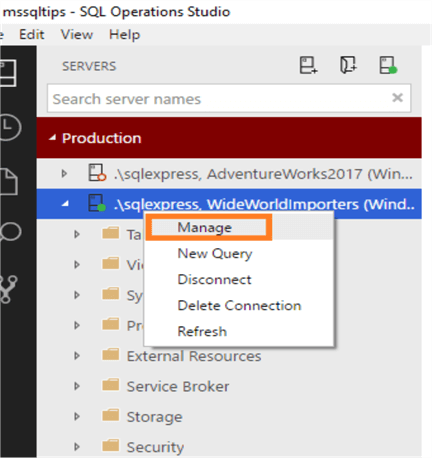
            Once we connect to the database instance, right-click on the instance name and click Manage.
            manage
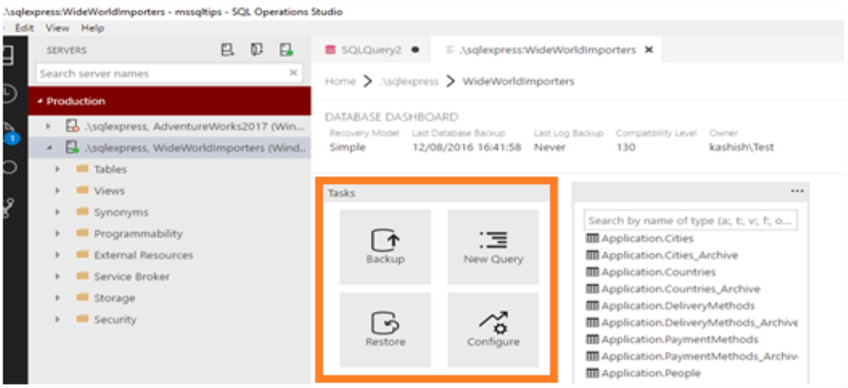
            This opens up the Tasks window, which has these options (highlighted in yellow square below):
            • Backup
            • New Query
            • Restore
            • Configure
            production
            We explored New Query and Configure in my previous tips, let's explore the Backup and Restore tasks.

            SQL Server Database Backup Options Using SQL Operations Studio

            As a starting point, as you probably already know about different backup types in SQL Server, such as these:
            • Full Backup
            • Differential backup
            • Log Backup
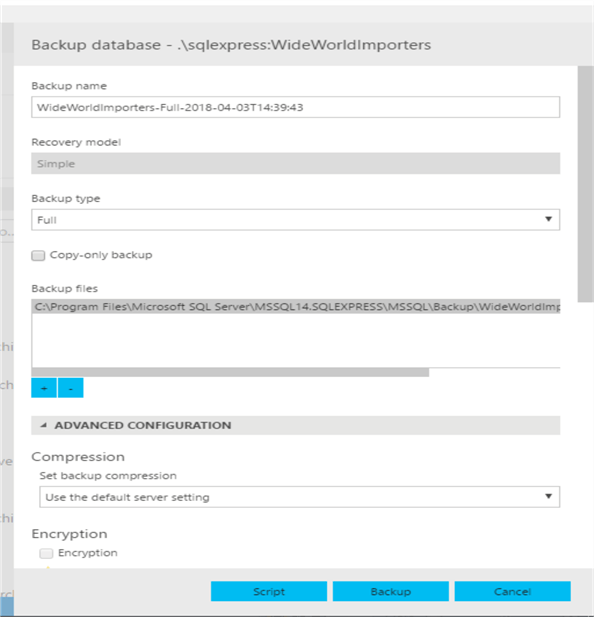
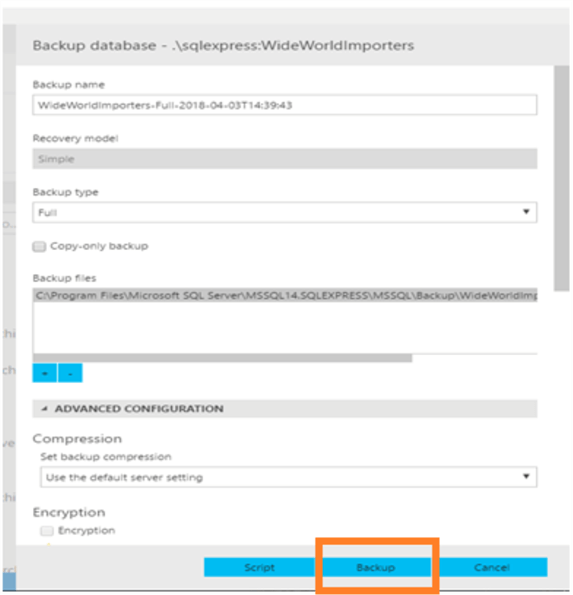
            To execute a backup using SQL Operations Studio, click on the Backup task. This opens up the below window to set up a backup.
            backup database
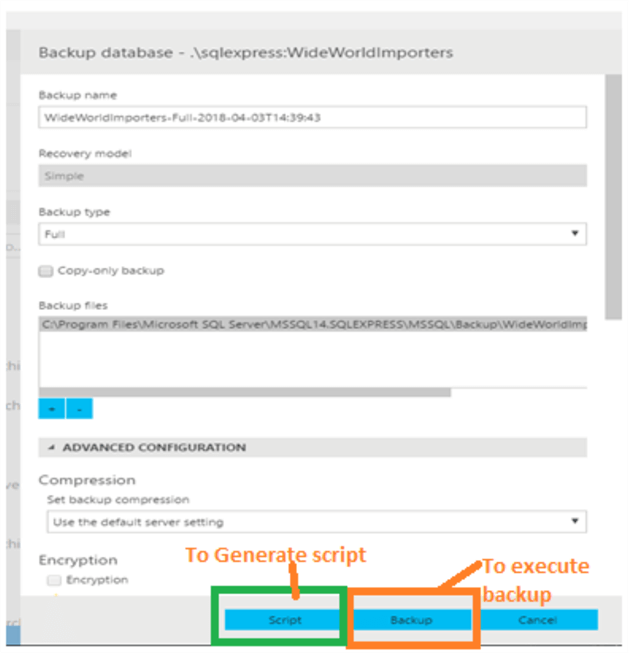
            We can see are these options:
            • Backup name: the default format is DBName-BackupType-BackupRunDate
            • Recovery model: this shows the recovery model of the database for which we want to take the backup.
            • Backup type: This shows the available database backup options for the database. For example, in Simple recovery model, only Full and Differential backups are available, so it only shows these 2 backup options.
            • Copy-only backup: If we want to take a copy-only backup, tick this option to execute a copy-only backup.
            • Backup files: It shows the backup location as the default backup directory. If we want to change it, click the "-" icon below to remove this backup location and then the "+" icon to add the file into the desired location.
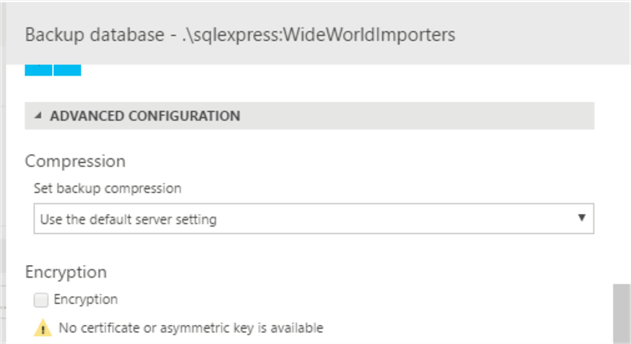
            There are some advanced configuration options available, which are shown below:
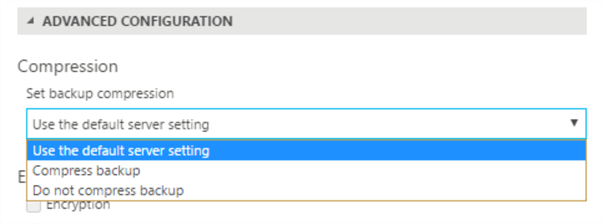
            • Compression: By default, compression is set to use the default server setting. If required, we can change it to compress the backup or not compress the backup.
            advanced configuration
            • Encryption: If Certificates are available for encryption, this encryption checkbox will be available. In my case, I do not have a certificate or asymmetric key, so this option is disabled.
            backup database
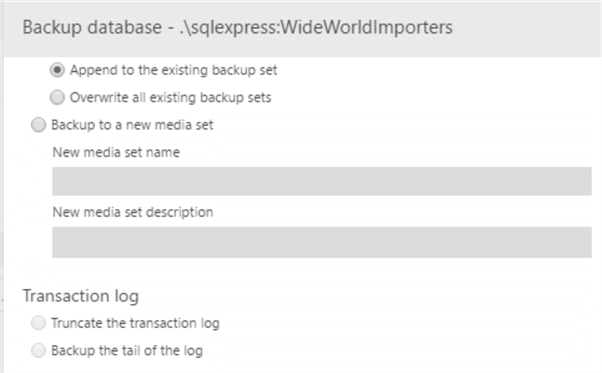
            • Media: We can set the option to append backup to existing backup set or to a new media set.
            • Transaction log: If the database recovery model is full, we can select an option such as truncate the transaction log or backup the tail of the log.
            backup database
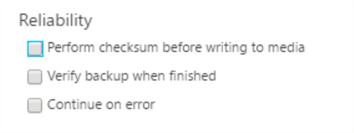
            • Reliability: Under this option, we can select the options to validate the backup set such as:
            • Perform checksum before writing to media
            • Verify backup when finished
            • Continue on error
            reliability
            • Expiration: We can set how long to retain the backup in days. By default, it is set to 0 that means the backups never expire.

            Executing Database Backup Using SQL Operations Studio

            In this demo, I will be taking database backup with the default options. To execute a backup, we have two options:
            backup database

            Backup Database Using Script Option

            When we click on Script, it generates the backup script in a new query editor. In the Task History, it shows status as Backup Database scripting succeeded.
            backup database
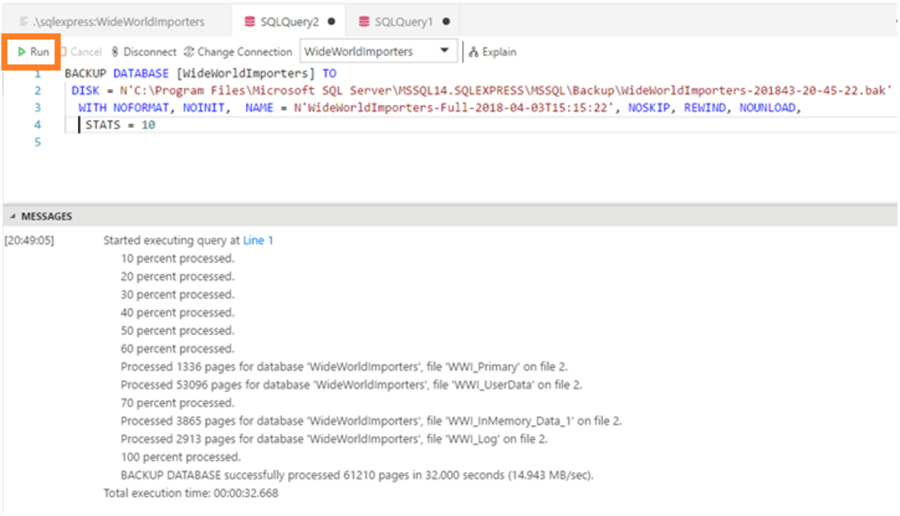
            After it has been scripted, we can click on Run to execute the backup of the script generated.
            run

            Backup Database Using Backup Option

            Click on Backup at the bottom, will execute the backup.
            backup database
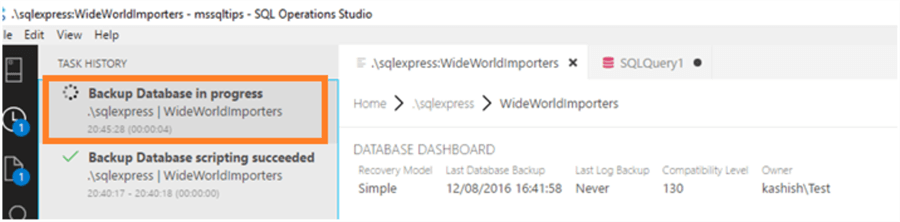
            Once the backup is in progress, we can see it in the Task History.
            backup database
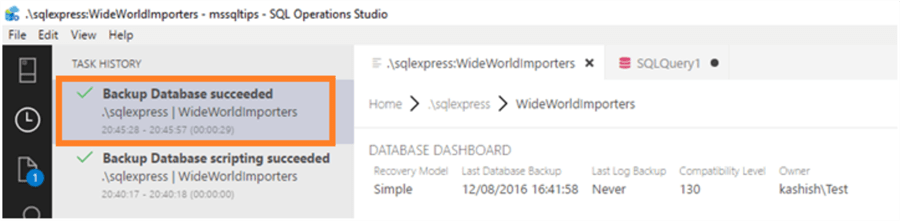
            We can see the Backup Database succeeded information is logged in the Task History once the backup has completed.
            backup database
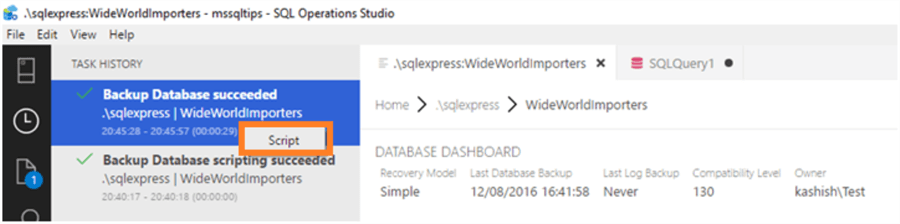
            We can also get the script by right clicking on the Backup Database succeeded in Task History as shown below.
            script
            We can see the script that backup task used for taking the backup.
            database

            Restore a SQL Server Database Using SQL Operations Studio

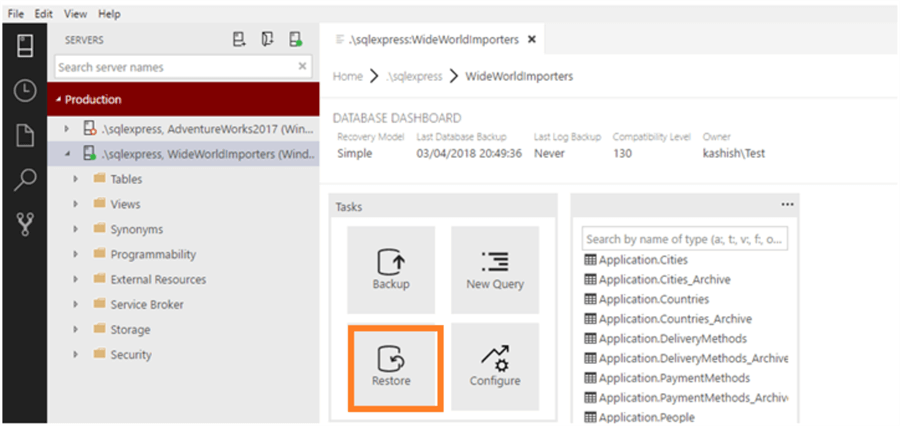
            In the demo, we will restore the database from the backup we just created. The Restore task is in the Tasks section.
            production
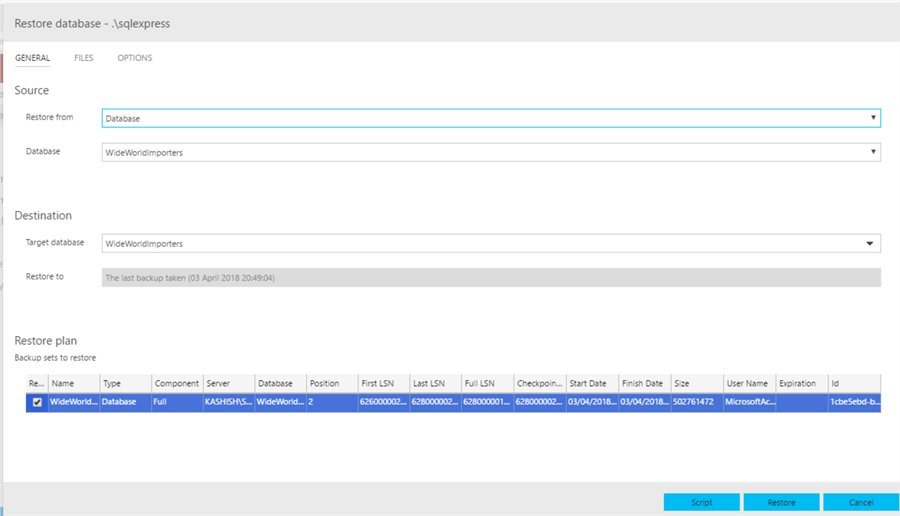
            Once we click on Restore, this opens up the restore database window.
            restore database
            Let us go through the restore database details. There are three tabs to configure for a database restore:
            1. General
            2. Files
            3. Options

            General Tab

            This tab is useful for setting up the source, destination database, restore plan, etc.
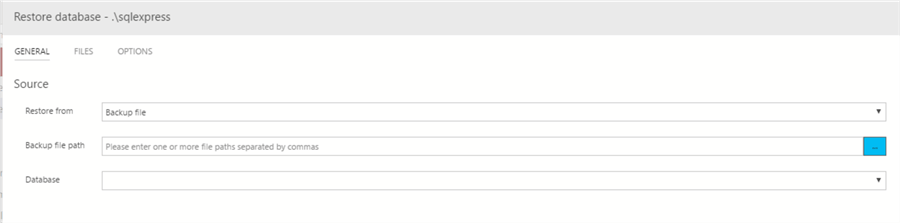
            • Source: We can restore the database from the database or from the backup file. If we want to use a backup file, we can select it from the drop-down menu.
            database
            If we select the option Backup file, another window opens up for providing the backup file:
            press
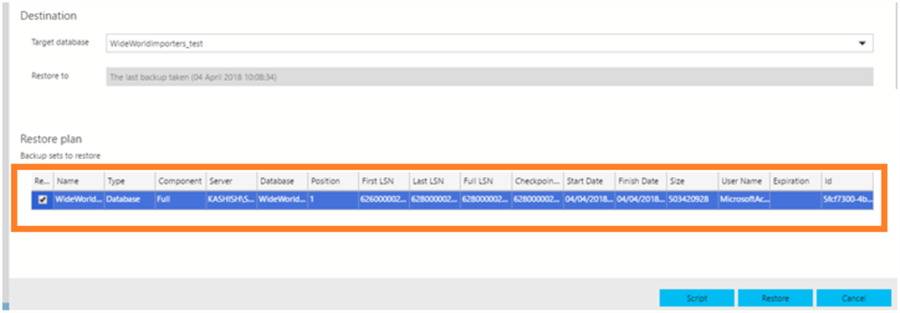
            Destination: In this tab, we have to select the destination database.  Enter the target database name and it shows the restore date as of the last available database backup. In my case, it shows the last backup was taken  "04 April 10:08:34".
            It also shows the restore plan along with details of First LSN, Last LSN, Full LSN, CheckPoint, Start date, End date, etc.
            destination

            Files Tab

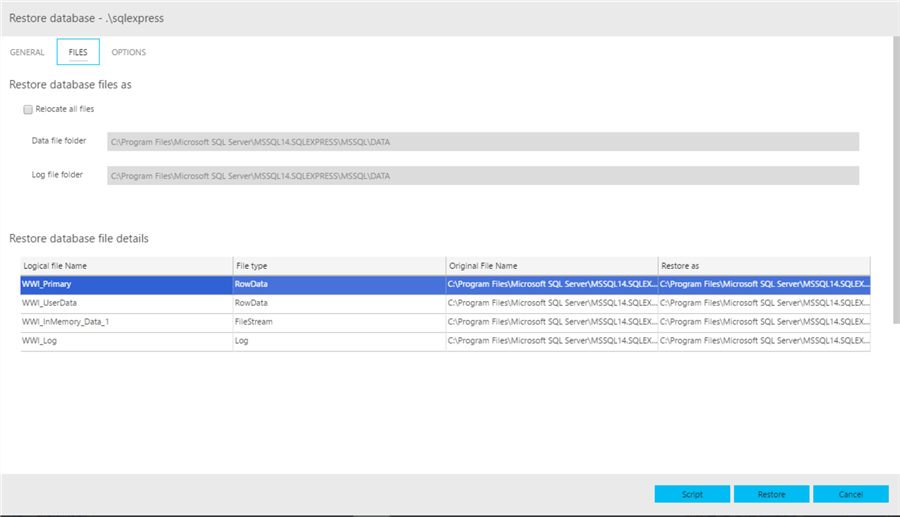
            In this tab, we can configure the database files location and can view the restore file location with the file name.
            row data
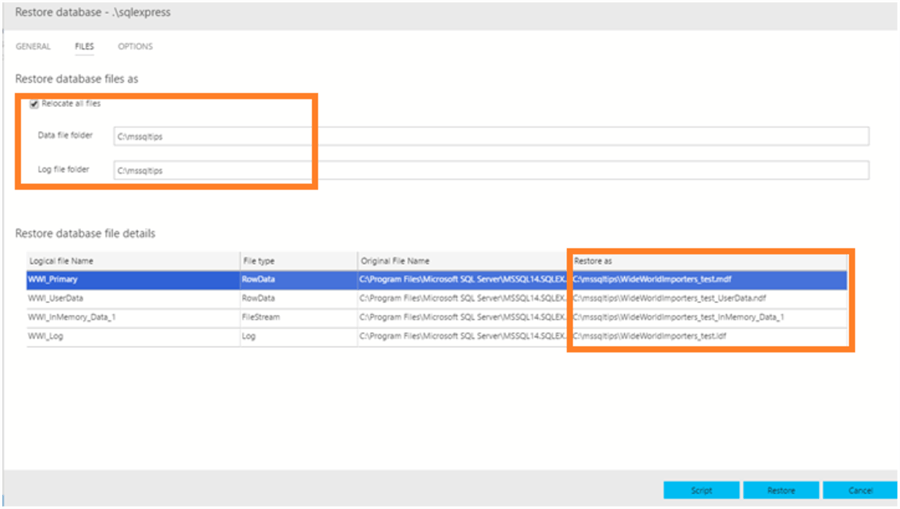
            By default, the Relocate all files option is disabled. If we want to move the files from other than the default location, check this option and enter the new location. In this demo, I want to replace all files into the C:\mssqltips folder.
            database
            We can see the files location is pointing to the new location mentioned above.

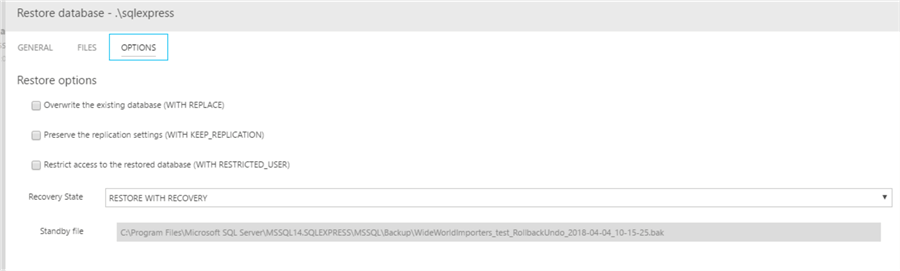
            Options Tab

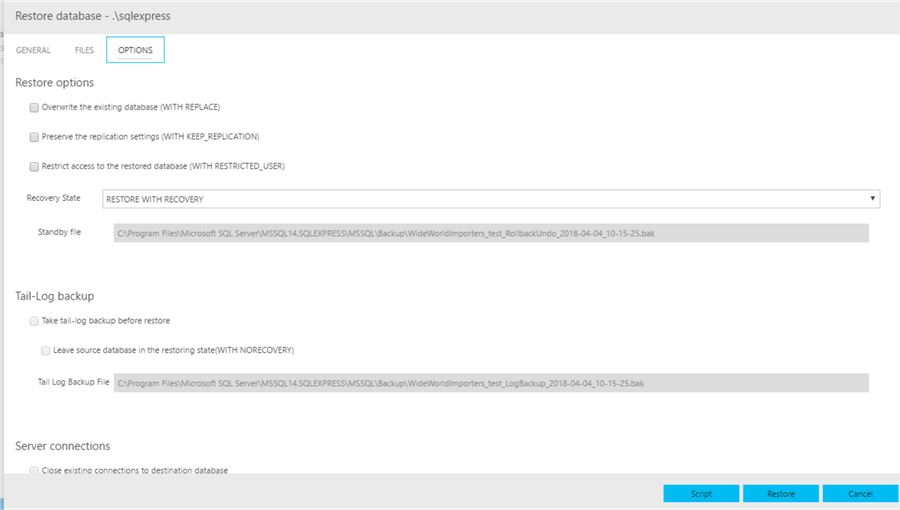
            In this tab, we can choose restore options, recovery state, connection state, etc.
            options
            Restore Options:
            • If we want to overwrite the existing database, check Overwrite the existing database (WITH REPLACE)
            • To preserve replication settings, check Preserve the replication settings (WITH KEEP_REPLICATION)
            • If the access to the database needs to be restricted, check Restrict access to the restored database (WITH RESTRICTED_USER)
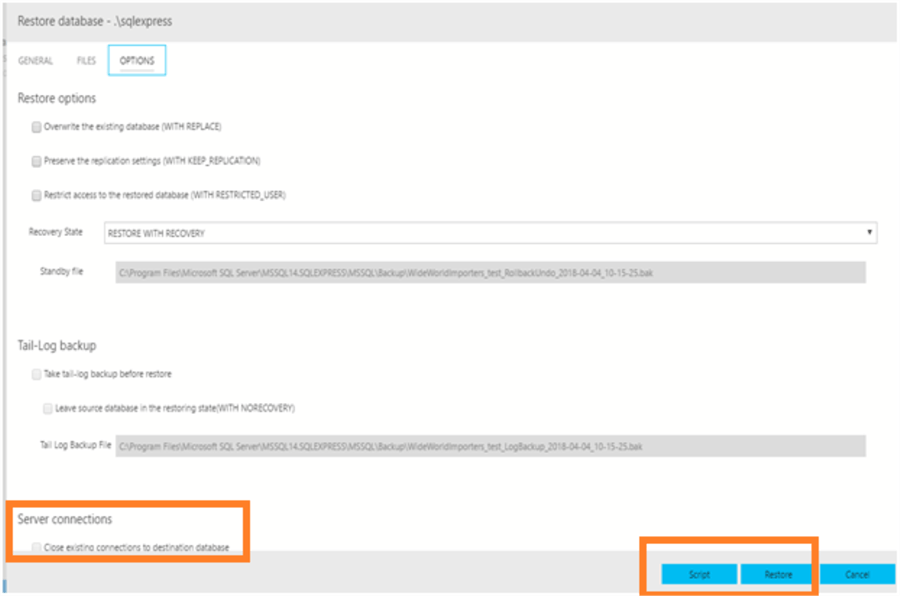
            options
            • Recovery State- we need to specify the state of the database after the restore.
            restore with recovery
            • RESTORE WITH RECOVERY: If we want to perform recovery of the database and make database ONLINE.
            • RESTORE WITH NORECOVERY: If we want to apply further restores on this database and do not want the database recovery to be performed, select this option.
            • RESTORE WITH STANDBY: If the database needs to be used in standby mode, select this option.
              • We also need to specify standby file location as well.
            restore with standby
            Tail-Log backup:
            • If we need to take a tail-log backup before the restore, select this option. We also need to specify the Tail Log Backup Filelocation for taking backup.
            tail log backup
            Server Connections:
            • The last option is to close existing connections to the destination database. Sometimes we face issue when restoring the database because users are still connected to the database. To restore the database, the database should have no users connected. Therefore, by selecting this option, we can close all existing connections and start the database restoration.
            options
            Script or Restore:
            • Now for running the database restore, we can either generate a Script and execute the script or directly run it after clicking on Restore.
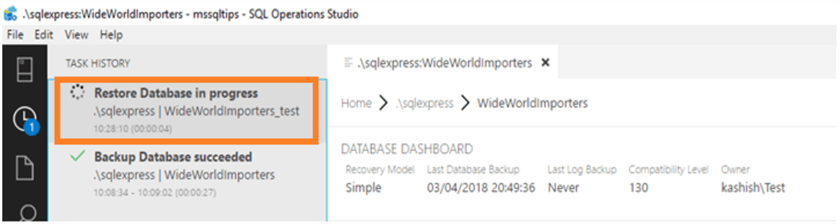
            We can see the restore database progress in the Task history.
            restore database in progress
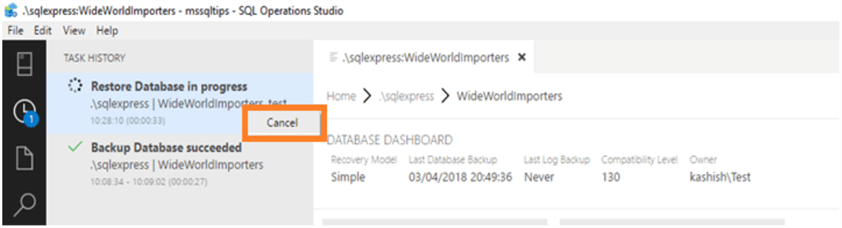
            If we need to cancel the restore, right click on the Restore Database in progress status and click Cancel.
            cancel
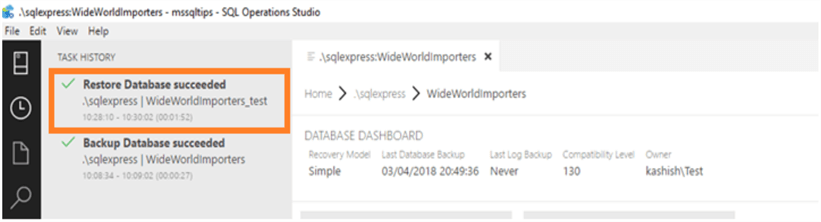
            The Restore Database succeeded status is logged in the task history.
            succeeded
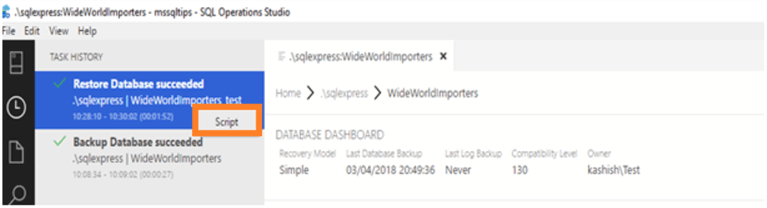
            Right click on the Restore Database succeeded message and click on Script.
            script
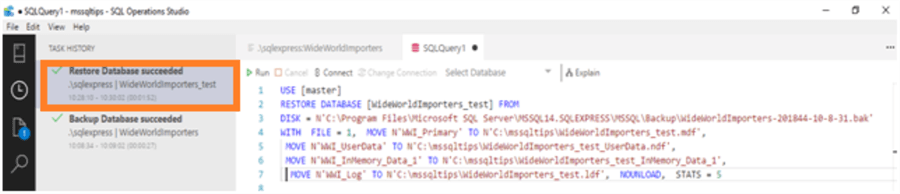
            This generates the script used in the database restore operation.
            restore database
            Next Steps